What Odoo's AI can actually do in 2026 — and where a governed layer fits
ⓘ About this article & how it was made
Odoo 18 added assistive AI — editor text generation, lead scoring, invoice OCR on Enterprise. Odoo 19 is the step change: a native AI app with agents that chat and act, AI fields in Studio, plain-language automations and Ask AI search. Nearly all of it is Enterprise-only, per Odoo's own docs and forum. If you run Community, or 17/18, that is where a governed third-party layer does the work — and on Enterprise 19, native AI and a governed layer solve different problems side by side.
Odoo now ships real AI of its own. Version 19 brought a dedicated AI app: agents you can chat with, AI-computed fields in Studio, natural-language server actions, transcription, and smarter document handling. Most of it is Enterprise-only. This guide covers what ships natively in Odoo 18 and 19, what each edition gets, and where a governed AI layer like Odient fits alongside it — written to be useful whichever way you go.
A note on where this is written from: Zehntech has been building on Odoo since 2013 — an Odoo App Store publisher, with implementations on both editions — and our habit with every release is to read the source before the release notes. Odoo 19 was the first version where the AI app was the thing we opened first.
#The short version
Odoo 18 laid the groundwork: AI text generation in editors, lead scoring and forecasting, invoice OCR with smart reconciliation on Enterprise. Odoo 19 is the real step change — a native AI app with configurable agents that can answer questions and act on records, AI fields, and plain-language automations. If you run Enterprise on 19, you have genuine AI in the box. If you run Community, or Enterprise on 17 or 18, the native feature set is thin — and that is where the third-party ecosystem, Odient included, does its work.
#What ships in Odoo 18
Odoo 18's AI is best described as assistive, and it lives inside existing screens rather than in a place of its own. The HTML editor can draft and improve text — product pages, marketing emails, website copy — from a prompt in the toolbar. CRM carries predictive lead scoring, which ranks pipeline opportunities from historical win patterns, and sales forecasting on top of it. Inventory gets demand forecasting against consumption history. On Enterprise, Accounting adds the standout pair: vendor-bill OCR that reads an uploaded invoice into structured fields, and reconciliation suggestions that match incoming payments to open invoices. Useful, focused, mostly invisible — AI as a feature, not a colleague.
What 18 does not have matters just as much for planning: no conversational assistant, no agent that acts on records, no natural-language automation. If someone demos those on an 18 instance, a third-party module is doing the work.
#What Odoo 19 adds
Version 19 is where Odoo says AI out loud. The pieces, each per Odoo's own documentation (AI overview, AI agents):
AI agents — the headline. Configurable assistants reachable from a chat interface, Chatter, and the email composer. They answer questions about your data and can perform actions: create records, update fields, trigger workflows. Configuration is genuinely flexible — you scope which apps an agent may reach, and you can train it on internal documents and knowledge articles so it answers in the context of your own policies. Partner writeups (Certum, OBS Solutions) note ChatGPT and Google Gemini as supported model backends.
AI fields and server actions — Studio grows judgment. A field's value can now be generated from a prompt over the record's other data: a product description written from its attributes, an opportunity summary from its chatter. Server actions accept plain language — describe "send reminders to customers with invoices more than 30 days overdue" and Odoo builds the automation. This is the quiet one to watch: it moves AI from answering into your business logic.
Ask AI search, transcription, and content. Natural-language database search instead of filter syntax, meeting transcription with summaries, and broader generation across website, email and live chat — including first-line customer responses that can be configured to create leads or tickets.
That is a serious feature set, and it changes what "AI in Odoo" means: the platform itself now teaches its users to expect assistants that act.
#The edition question
Here is the part that decides most real-world plans. Per Odoo's documentation and forum guidance, the agents, AI fields, OCR and natural-language automations above are Enterprise features; Community's native share is mainly editor text generation. Odoo's own forum states it plainly: Odoo AI is available in the Enterprise version, not in Community. Community users report the same on that thread: beyond text generation in editors, the native AI set does not reach Community.
| Capability | Community | Enterprise |
|---|---|---|
| AI text generation in editors | In some editors | Yes |
| Lead scoring, forecasting | Not included | Yes (18+) |
| Vendor-bill OCR, smart reconciliation | No | Yes |
| AI agents (chat + actions) | No | Yes (19) |
| AI fields, NL server actions | No | Yes (19, Studio) |
| Ask AI search, transcription | No | Yes (19) |
Availability as stated by the Odoo documentation and forum guidance linked above; partner edition matrices report the same.
None of this is a criticism — Enterprise funds Odoo's development, and gating flagship features to it is a coherent business model. But if you run Community, or you are on 17 or 18 with an upgrade some quarters away, the native path gives you little AI to work with today.
#If you run Community today, your three paths
Wait and upgrade. If an Enterprise 19 move is already planned, the native AI app arrives with it. Weigh the full editions decision on its own merits — we wrote that comparison separately — rather than upgrading for AI alone.
App Store modules. The Odoo App Store carries a growing set of AI assistants and copilots, several targeting Community explicitly, plus MCP connectors such as MCP Server (xf_mcp). Quality and depth vary widely; the evaluation questions below apply to all of them.
A governed layer. A system that connects to the Odoo you already run — either edition, versions 17 through 19 — and adds the assistant, the actions and the governance as one piece. That is the category Odient is in, and the rest of this guide covers how to judge it.
#Where a governed layer fits
Whatever you evaluate, the questions that separate products in this category are the ones you would ask of anything touching your ERP: whose permissions does it act under, what happens before a write lands, and what record does it leave. We keep a 20-check version of those questions that works against any vendor, ourselves included.
Odient is our answer, and it is built for the whole Odoo world rather than one edition: it runs on Odoo 17, 18 and 19, Community or Enterprise, connecting to the instance you already have. Ask in plain language — in Discuss, on any screen, or from tools like Claude Desktop and Cursor — and it answers from live data with the source record attached, then prepares the actual work: the quotation drafted, the reminder written, the transfer staged. Nothing runs until a person approves it, every request passes the five-layer firewall enumerated on the security page, and every decision — allowed, blocked or approved — writes one audit record.
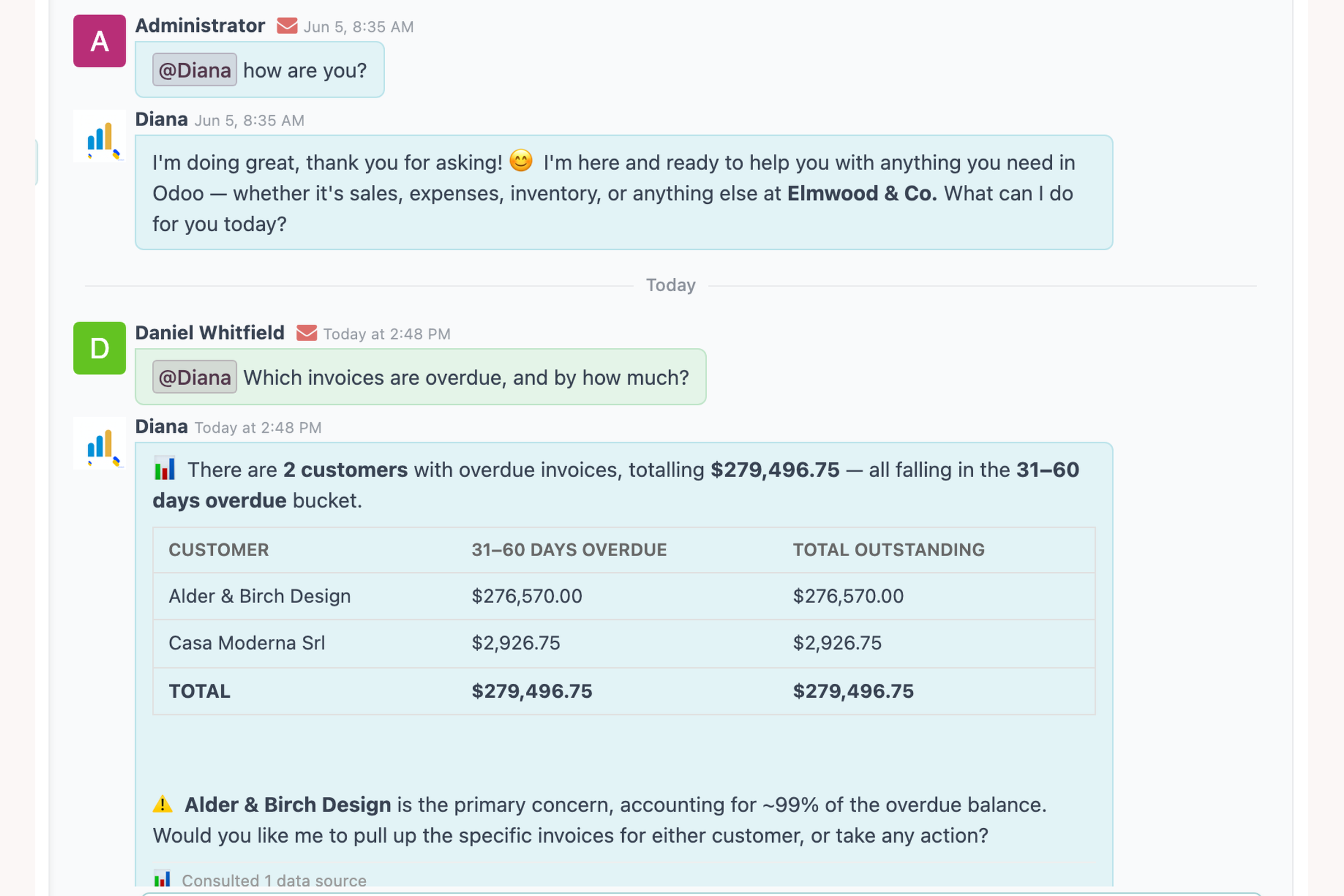
One engineering note on how a layer like this connects, because it affects your version planning. Odoo 17 and 18 are reached over XML-RPC, 19 over the newer JSON-2 REST API — and the two behave differently around API-key scoping, in ways worth understanding before you trust any vendor's "scoped access" language. Prasad wrote up what we found in the Odoo source on that exact question. A well-built layer handles the version differences for you and detects which modules you actually have installed, loading only the matching tools.
#How teams actually combine them
Native AI and a governed layer are not an either-or, and the pairings sort by what you run. On Enterprise 19, the natural split is native AI for in-place content and fields — descriptions, summaries, transcription — with the governed layer carrying cross-module questions and any action you want held behind an approval. On Community, the layer carries all of it. And in both cases the governance question stays the same: the moment any AI, native or added, can change records, you want the write policy, the approval gate and the audit trail to be settings you control rather than assurances you received.
#Frequently asked questions
Does Odoo Community have AI in 2026?
Natively, very little — basic text generation in editors. The agents, AI fields, OCR and natural-language automations of Odoo 19 are Enterprise features. Community teams add AI through third-party modules and layers; Odient runs on Community and Enterprise alike, versions 17 through 19.
Do I need Odoo 19 to get AI agents?
For Odoo's native agents, yes — 19 on Enterprise. For agent capability on 17 or 18, you need a third-party layer. Odient connects over XML-RPC on 17 and 18 and JSON-2 REST on 19 (the pricing FAQ states the same), so the version question stops being the blocker.
Can Odoo's native AI change records without approval?
Odoo 19's agents can perform actions within the scope you configure; review behavior is up to your setup. If approval-before-every-write is a hard requirement, test that specifically in your evaluation — it is the single question that most separates AI-in-ERP products. In Odient, writes wait for a person by design, and each decision is logged.
Is my data used to train models?
For Odient: no — your Odoo data is read to answer and act in the moment, never for training. For any vendor, native or third-party, get that answer in writing; it is check number one on our governance checklist.
Mahendra founded Zehntech in 2013 and has spent the years since shipping enterprise software and Odoo work — 80+ engineers, 100+ Odoo App Store modules. Odient is the AI layer he kept wishing existed.